Showing posts with label Productivity. Show all posts

Friday, April 17, 2015

Xray Girl Scanner Prank 1.1 (2) APK

Xray Girl Scanner Prank 1.1 (2) APK
Very interesting android app to scan any persons body, If you have smartphone/ android phone you can download this wonderful application from Google Play Store. If you android phone doesn't support Play Store or mobogenie than you can download its APK file, Follow below download link and enjoy this app.

Do you want to scan anyone's body with X-RAY? Xray scanner is a prank app to get fun and trick your friends!Here the xray camera scan for you.
Xray Girl Scanner Prank 1.1 (2) APK
Its a real trick to make fun with your friends and make your relative fool.
Xray Girl Scanner Prank 1.1 (2) APK
You will amaze with the picture quality as it is very realistic, rest upto your use of app.
Xray Girl Scanner Prank 1.1 (2) APK

Download Xray Scanner to scan your hand or leg or even your chest! Just point your camera a few inches from your chosen body part, wait for the scanning process to be completed, within seconds you will be able to see an xray of your hand or leg etc!

With our cool Xray Scanner you can view xrays and take xray like pictures that look like the negatives of a picture!

Disclaimer - Xray Scanner is a fun prank app. It is just a joke that does not hold any medical relevance.

Thursday, February 19, 2015

SwiftKey Keyboard 5.2.0.115 APK

SwiftKey for Android was recently updated in the Google Play Store with Chinese language support. This new update brings simplified Chinese, Taiwan traditional Chinese, and Hong Kong Traditional Chinese input options to use on your Android phone or tablet. Along with Chinese language support, this app also has a new theme to celebrate the Chinese New Year. And we’ve got the APK for you, as always, the latest APK file is available below.

SwiftKey Keyboard 5.2.0.115 APK

Let's get straight to the change log for the new SwiftKey 5.2.0.115 version:
Chinese support
• Simplified Chinese - QWERTY Pinyin, 9-key Pinyin and Stroke input methods
• Taiwan Traditional Chinese - Full Key Zhuyin, 9-key Zhuyin and Stroke input methods
• Hong Kong Traditional Chinese - Cangjie, Quick Cangjie and Stroke input methods
New Languages
• Khmer
• Lao
Additional Improvements
• General bug fixes
• SwiftKey Store optimizations

Will you be getting this SwiftKey update? Check out the app for free in the Play Store and let us know your thoughts on this latest features update. And if you can't get it in the Play Store you can download SwiftKey APK by clicking the download button below.

Requires Android: 2.3+
Download File: 28MB (SwiftKey Keyboard 5.2.0.115 APK)

SwiftKey Keyboard APK

Thursday, December 25, 2014

Download SwiftKey keyboard apk v5.1.2.75 Emoji ( Zippyshare )


SwiftKey keyboard Rev indir Zippyshare
Summary This
app is a free , grant -winning console application for Android that gets you, conveying the best next- word prediction, more witty autocorrect , helping more than 800 Emoji (emoticons ) Emoji prediction and significantly more! SwiftKey is an option touch console that provides you with brilliant , fast writing on Android - free . It is the best console for savvy Android for quick SMS , visit, content and e- mail , run in the standard of all your applications. It's stuffed full of custom oddities, including more than 30 lively topics, formats for all screen sizes and gadgets, and backings of more than 80 dialects.
Emoji Emoji AND PREDICTION
Ruin yourself with more than 800 Emoji- characters ( emoticons) and astute Emoji Prediction . Our brand prognosis tech recommends emoji to match your words - for the sake of entertainment filled sentences and grins all round .
trusted by millions
Customized SMS
Psyche read word suggestions to get you as you write, and get smarter over the long haul .
write more witty AutoCorrect
Sagacious autocorrections for even the sloppiest .
Beautiful THEME
your keyboard , your way
Part. Resize . Disconnection. Change your console with a range of effective devices to your needs.
Multilingual writing. Browse over 60 dialects and sort up to three immediately.
CLOUD - CONNECTED
Sync your composition style safely to the cloud and crosswise on gadgets .
only word expectations from your Gmail, Facebook, Twitter , Evernote and everything.
Sort without sweating about daily news, games and excitement subjects Trending sentences .
Get access to the SwiftKey Store to scan new topics.
effortless typing
Swipe your finger across the touch screen to sort with SwiftKey Flow or tap forecasts for simple, fast write.
Required : 2.2 and above Size : 26MB Version < / b> : 5.1.2.75
more screenshots on Google Play
Version 5.1.2.75
HERE

Sunday, December 21, 2014

Mobogenie Market Free (2.0.8.6) Latest version APK Free for Android

Mobogenie Market Free (2.0.8.6) Latest version APK Free for Android
We have come up with a cool app Mobogenie Market Free, an alternative to Google Play Store, for downloading android app directly from Google Play Store without logging into Google account. The official android app of Mobogenie Market is available on Play Store in order to download it in your android phone through Play store app. If your phone doesn’t support Play store, there is no need to worry. We are providing you with the latest version of Mobogenie Market APK, which is free of any kind of malicious files. The Mobogenie provides secure and harmless apps for its users.

The latest version of Mobogenie Market was launched by Mobogenie on November 4, 2014. The latest version of this app has been improved by the developers in order to increase its reliability and speed. This app is provided for free by the developers.

Mobogenie market free latest apkMobogenie market free latest apk free downloadMobogenie market free latest version

Before downloading the APK file of Mobogenie Market Free, you should go through the wonderful features of this app in order to use it easily.

Features of Mobogenie Market Free 2.0.8.6:

This is a feature-rich app and no other android app provides such kinds of facilities. Almost every product you need for your android phone is available in just one app.

The developers have categorized the entire product so that the users can find and download the apps easily, without the time being wasted. Categories such as apps, games, music, pictures, videos etc. are provided for better interaction with the app.

You can also backup all your data from the app to your phone like apps, games, music, contacts, pictures and videos with a single touch.

There is also an option to clear the app’s memory to make it run faster and save the battery power.
You can download from over 1,200,000 free apps and games; over 600000 free wallpapers; more than 400000 free ringtones.

With such rich features, this app will never let your phone get slow.

You can search for your favourite things with easy steps and you will get the best results, as expected.

Friday, November 28, 2014

Mobogenie v2.0 Latest Version Free Download (.APK) File for Android

Mobogenie v2.0 Latest Version Free Download (.APK) File for Android
We are here with the best android app “Mobogenie” which released its latest version 2.0 with a lot of new features. If you haven’t installed this app yet, click the download link below and download its latest version .apk file and install it in your smartphone. If you have already installed it in your smartphone, then just update it to use its wonderful features.

Mobogenie is an Android synchronization app which is used to download applications from the app-store, easily and quickly. It is being powered by Gamease Age Digital Technology Co., Ltd. ("Gamease Age"), and was newly launched on August 2007. Before installing the latest version of Mobogenie 2.0 (.apk file), you would love to know about some features of this Android app.

Mobogenie supports following languages:
English, Spanish, Portuguese, Italian, Polish, Arabic, Russian, Indonesian, Vietnamese and other languages.

Features of Mobogenie 2.0:
Mobogenie 2.0 provides its users genuine and safe apps, so there is no need to worry about the viruses or anything harmful to your smartphone software, as all the applications of Mobogenie had been scanned by Kaspersky. Press the download link below and enjoy this cool app. Manage your Android apps, games and launchers easily. This app makes it easy for the users to upgrade their apps whenever an up-gradation is available.

Mobogenie provides a very unique facility to its users; users can transfer files from their Android devices to the PCs and to the Android device form their PCs. This app also has PC software that can attach both the PC and the Android device, but Mobogenie must be installed on both of them. Backup of your phone contacts, messages, apps, music, images and videos is very important as phone software may crash or get formatted, and all your data may get lost; so this app provides you the facility to store all of your personal data in your PC and restore all that data whenever you want to. As Google’s Play store features to transfer the apps from phone memory to SD Card memory, the same feature is available in this newly upgraded app (Mobogenie v2.0).

We recommend you to use this app with its new features, as it makes it easier for the user to organize his/her smartphone. This app will automatically inform you about any of its new version launched in the software market.

Click the download link below to start its .apk File download. Install it in your device and Enjoy..!

Sunday, March 16, 2014

DFX music player Enhancer Pro v1.27 for Android

DFX player was created by the engineering team that developed the award-winning audio technology used by Grammy producers and engineers
.
Thanks to recent advances Android processing speed of the device and the power , technology DFX Audio Processing is finally available on your Android phones and tables.
DFX music player Enhancer Pro v1.27 for Android
style =
" line -height: 24px ; margin: 0px; padding: 0px; " /> DFX processing technology restores the high frequency harmonics that were damaged in the MP3 encoding process and also greatly increases your low frequency response without lower your levels of reading . DFX also restores the natural depth lost your music listening experience more natural .
Player DFX also includes multiband equalizer really professional that has been used by Grammy producers and engineers
Finally you can enjoy your MP3 songs without thud natural bass response and limited music players of the past and make equalization without distortion or loss of quality adjustments.
Features:
- Uses advanced DSP processing to significantly improve the response of the sound quality and bass players on Android existing music
- powerful but easy to use the song , artist and playlist -based music selection and playback methods
- Includes DFX Audio Processing byte presets to optimize your DFX best listening environment and personal tastes, including Bass Boost presets
- Includes quality really professional multi-band EQ used by Grammy producers and engineers
Try DFX player now hear what you 've been missing . . .
More background on DFX Audio Enhancement
the equalizer DFX treatment effect and has been in development for more than 20 years and is currently ranked the best cum audio application in its kind. You will immediately notice the large volume of the Boost and the overall sound quality of any song or other media you are playing. Clear available DFX audio level control is unmatched by any other sound amplifier or booster
. DFX activator Music Player Pro for Andrew
< / center>

Pro v3.11.3 PDF Reader for Android


Book Reader and PDF documents with . DjVu and support for comfortable reading
If you want a good PDF reader , stop here , you've found
. it does what you expect it to do. You can easily set and read books and PDF documents with the application
Pro v3.11.3 PDF Reader for Android
The incredible improvement decrease the intensity of the screen in a way that does not hurt your eyes
Easy to put on and keep scrolling. . The best of all functional readers
functional
1) Operating mode and Read ( single tap control to change )
2) pages per set width recorded on scroll
3) Search books
4 ) Table of Contents
5) night mode
6) searches for all books (PDF, DjVu ) on the device
7) next page or pages scroll the screen tap
8) full screen mode
keys 9 ) Support Nook e-reader as , Kindle , Sony
Navigation 10) file
11) recent books
black theme 12 ) light
Guideline 13 ) screen : Portrait, Landscape, automatic
14) Favorites text for the page
15) links History back to the page
borders 16) Crop
17 ) Automatic scrolling
18 pages) Swipe mode lock
19 ) Support Intel Atom CPU x86
20) book and page thumbnails
21) books recent scroller
22 ) email , share documents and bookmarks
23 ) Import, Export Settings
Functional PRO
1) no ads, no permission Internet
2 ) Support password protected PDF files
3) Result search Filter
4) Result search by name , path , size ( ascending, descending )
5 ) the brightness of the screen of the application
6) Define custom scroll to next page down keys

< . b> The best PDF reader for Android

< / center>

Saturday, March 15, 2014

The Expert PDF ( Max) of v2.8.1 for Android


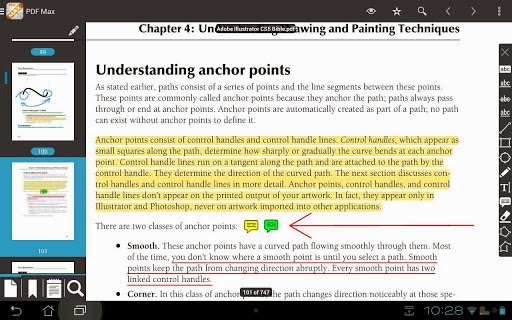
PDF Max is 5 - star , open PDF reader features used by millions of iPhone / iPad users worldwide and now available for your Android. It was designed for people who are looking for a complete application optimization professional PDF touch-based . It provides all the features you need for a PDF application every day at the same place , so you do not need to spend extra money for other applications
.
PDF Max features include:
[PDF Reader Professional]
text reflow PDF Max includes a stunning feature text reflow that allows you to read your PDF files easily with any type of PDF . . Forget the tedious steps pan zoom , you will enjoy reading your documents right now
Text To Speech : Do not keep your eyes on the screen all the time , That the function TTS superb PDF Max works he read PDF documents for you.
fast rendering PDF Max team engine ultra- fast rendering worked smoothly on all Android phones / tablets with Android 2.2 or later

Quick Scroll : PDF Max is the best PDF application that allows continuous vertical scrolling through an entire document . You can also set the option to display one page at a time, it's your choice .
SMART ZOOM : Double- click on the text blocks and PDF Max enlarge the text block touched to fit the screen. . Simple reading and effective
IU NAVIGATION : The Navigation pane allows you to interact with your documents thumbnails , bookmarks , annotations , PDF outline, research or other common shares
lARGE PDF : PDF Max opens easily large PDF files without any problems. The maximum file size depends solely on the file size supported by the device itself.
[ Full PDF Annotator ]
PDF ON YOUR TYPE .
PDF Max allows you to insert text in your PDF creating FreeTexts (aka Typewriter )
DRAW WITH YOUR FINGER :
Use your finger or a stylus to take handwritten notes or highlight text in books, whether normal or scanned PDF . Eraser is of course also included to help you to correct and refine your writing
MARK UP TEXT
Mark important things in books , magazines or documents with Highlight, underline , cross out and not straight tools.
create notes and conversations
Add comment anywhere in the document. PDF Max even takes over - conversations to help you collaborate with others like never before.
create shapes
Draw , position and resize a variety of shapes , including rectangles , lines, ovals, polylines , and polygons with smart snap .
Manage PDF pages , bookmarks
You can rearrange pages , insert blank pages and even remove PDF pages. Max PDF also supports the management of PDF bookmarks
[Easy to use and powerful manager FILE ]
Manage your own library of PDF or all PDF files on your devices easily with intuitive management interface file. Dropbox is supported , more storage will be supported in future updates
. Expert PDF ( Max) Download Links
< / center>


Copyright @ 2013 Unlimited Apk Download.